The new OmniScan™ X4 phased array flaw detector is expanding the possibilities of nondestructive testing (NDT), combining fast, accurate flaw detection, advanced imaging technology, and rugged performance with the power to continually grow and diversify. Another hallmark of the OmniScan line is its ease of use. Through decades of developments and improvements, we’ve honed the instrument’s software to a clearcut yet comprehensive step-by-step workflow, offering a range of tools that optimize the efficiency and capabilities of users, from setup to analysis.
A prime example is the OmniScan X4 onboard scan plan builder. It’s been thoughtfully designed with tools that simplify your setup, including clear 3D modeling enabling you to define and scan parts in any direction, supporting precise orientation and easy positioning of the scanned area within the asset.
Did you know that now you can have all the tools of the onboard scan plan on your PC or laptop?
Optimize Your Workflow, Boost Your Productivity
Designed to complement your OmniScan™ X4 unit, ScanPlan software enhances the efficiency and consistency of your inspection process. By enabling off-site setup creation, this computer software helps maximize your OmniScan X4 unit’s on-site availability while allowing you to work comfortably, when and where it’s most convenient.
Integrating ScanPlan software into your process not only improves your resource management and increases standardization but also supports more predictable budgeting.
Free Updates—No Recurring Fees
ScanPlan’s perpetual software license means there are no hidden or recurring fees. Installation of ScanPlan software is fast and easy and can be done directly from our website’s Software Downloads page. No USB dongle is needed. Once installed, your ScanPlan software can be updated with every new release at no additional charge.
Same User-Friendly Interface of the OmniScan X4 Scan Plan
For OmniScan X4 users, there is zero training required. With ScanPlan software, you can build the same NDT inspection setup on your PC exactly as you would with the onboard scan plan. All the tools are right there on your computer.
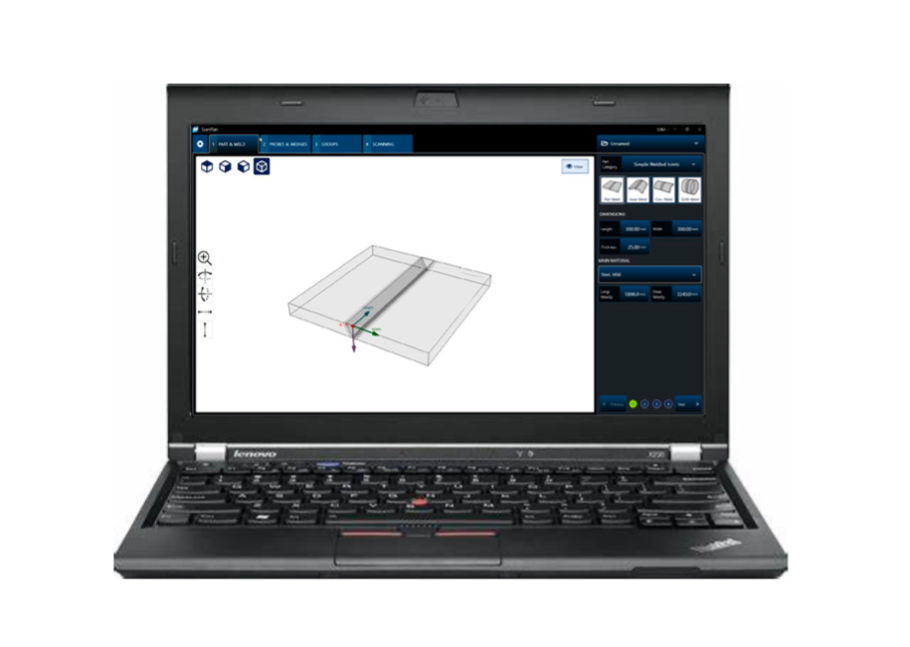
The user interface and functionalities of ScanPlan software are nearly identical to the scan plan builder in the new OmniScan X4 flaw detector.
Simple and Intuitive Setup Builder
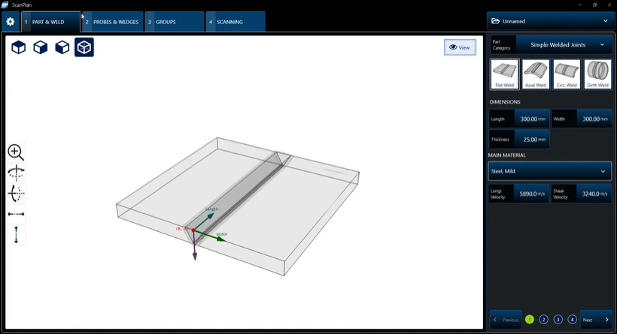
ScanPlan PART & WELD tab, used to define and edit your part and weld parameters based on weld type, length/width, thickness, material, longitude/shear velocity, and more.
You can edit your part based on Weld or Not, Geometry, Dimensions, Thickness, Material, and more.
Next, you set your probe and wedge parameters or select an application preset on the PROBES & WEDGES tab.

ScanPlan PROBES & WEDGES tab, used to define and edit your probe and wedge parameters based on type, pulsar/receiver connectors, length/width, and more.
Then, on the GROUPS tab, you can select your number of groups and edit each of them: Linear, Sectorial, Compound, PAUT / 0° with Overlap, TFM / PCI, or PWI. You may also rename each group.
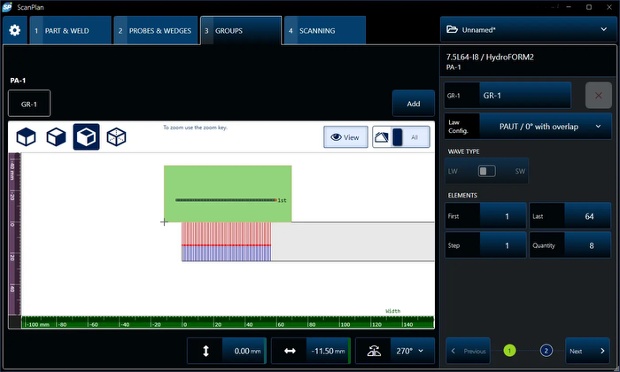
ScanPlan GROUPS tab, used to select and edit groups based on group type, law configuration, wave type, elements (first, last, step, quantity), length/width, and more.
Lastly, on the SCANNING tab, you can configure and edit your scanning pattern.
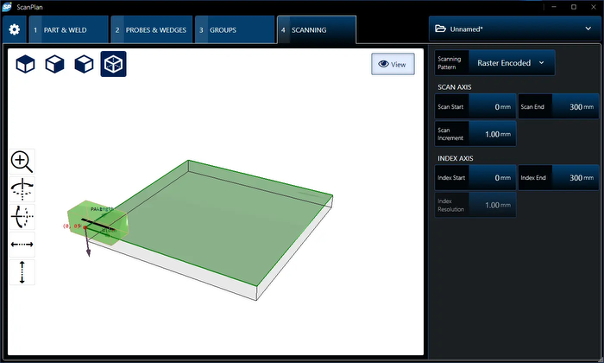
ScanPlan SCANNING tab, used to configure and edit scanning patterns based on pattern type, scan axis (scan start, scan end, and scan increment), and index axis (index start, index end, and index resolution).
Once your setup is complete, you can save your file to a USB key or OneDrive and then transfer it to your OmniScan X4 flaw detector, other data acquisition unit, or software. ScanPlan software supports the .uset file format, which is compatible with the OmniScan X4 flaw detector (all models), QuickScan iX PA+ data acquisition units, and AeroView Inspection software (used to drive an OmniScan X4 unit).
To make sure you stay at the forefront of inspection technology, your ScanPlan software gains new features and improvements with our free quarterly updates. ScanPlan license holders can also download the latest version for free by clicking here.
If you are interested in more details, reach out to your local Evident representative or contact us.
Related Content
Revealing the Power of the OmniScan™ X4 at ASNT 2024
5 Great Ways the New OmniScan™ X4 Keeps You Ready for What’s Next
Combine Advanced Analysis and Powerful Acquisition into a Portable Inspection Ecosystem